Mastering Workflow Automation: A Comprehensive Guide to Building Workflows with Celery
Published · Updated
Overview
In this course, we will learn how to create workflows using celery. After completing this course, you will be able to:
- Understand what is celery
- Know how to pass parameters between tasks
- Make the difference between sequential and parallel workflows using celery
- Create advanced workflows using celery
What is celery ?
Celery is an open-source asynchronous task queue/job queue that allows the execution of tasks in the background or at scheduled intervals. It is designed to handle real-time processing and distributed task management using message brokers.
The main components of celery are:
- Client application (Producer): The component that sends messages to the message broker (using apply_async, delay or send_task functions)
- Message Broker: Intermediary queue system between client and worker, Ex: RabbitMQ, Redis...
- Worker: The process that listens to the message broker for incoming tasks. Can be distributed across multiple machines, and they can run concurrenly allowing for parallel task execution
- Result Backend: A storage system where the result of task are stored, this component is optional. Ex: RabbitMQ, Redis...
Celery use cases
Celery is a versatile task executor, allowing tasks to be written in straightforward Python code. From its use cases, we can identify various applications such as:
- Asynchronous task executions
- Web scrapping
- Data Processing Pipelines
Implement workflows with Celery
In this section, we will discover how to share data between tasks in celery, how to use celery chain to create sequential workflows, and how to use chain and group to build Direct Acyclic Graph workflows.
Passing parameters betweeen tasks
Before creating workflows, we must first learn how to share states between Celery tasks. Try executing this code in your celery project.
12from celery import task34result = 05@task6def add(a, b):7 result = a + b8 return a + b910@task11def show(val):12 print(val)1314add.delay(1, 2)15show.delay(result) # This will print 016
The returned result is 0, The second task is unaware of the change made by the first task. This is because Celery tasks run in different processes and could also be executed on different servers. So, to share states between tasks it is not possible to use global variables. Instead, you should use external storage (Databases, S3...) or pass parameters between tasks using Celery's Canvas, as we will see in the next section.
Sequential workflows
In sequential workflow, tasks are executed in a specific, predefined order, with each step depending on the completion of the previous one. This is a sequential workflow composed of two tasks., add and show, we can execute this workflow by calling the tasks one by one, as follow:
12from celery import task34@task5def add(a, b):6 return a + b78@task9def show(val):10 return val1112add.delay(1, 2)13show.delay(10)14
In this case, the first and second tasks will be dispatched to the broker. This workflow works well because the second task does not depend on the result of the first task. What if we want to use the result of the first task in the second task? The second task must wait for the first task to finish execution.
12result = add.delay(2, 2)3add_result = result.get() # The code will be blocked until we get the result from celery4show.delay(add_result)5
This code will resolve the issue, but it's not fully asynchrounous, our code will be blocked until we get the result from the first task. To resolve this issue, we can use celery chains. The following workflow is composed of two tasks, add and power. In this workflow, we add two numbers in the first task and we apply the power of two to the result of the addition operation.
12from celery import chain, task34@task5def add(a, b):6 return a + b78@task9def power(*args, **kwargs):10 add_result = args[0] # Notice here that we get args[0], this will contain the result of the add task11 return add_result ** 21213my_chain = [add.signature(1, 3), power.signature()]14res = chain(my_chain).apply_async()15print(res.get()) # This print 1616
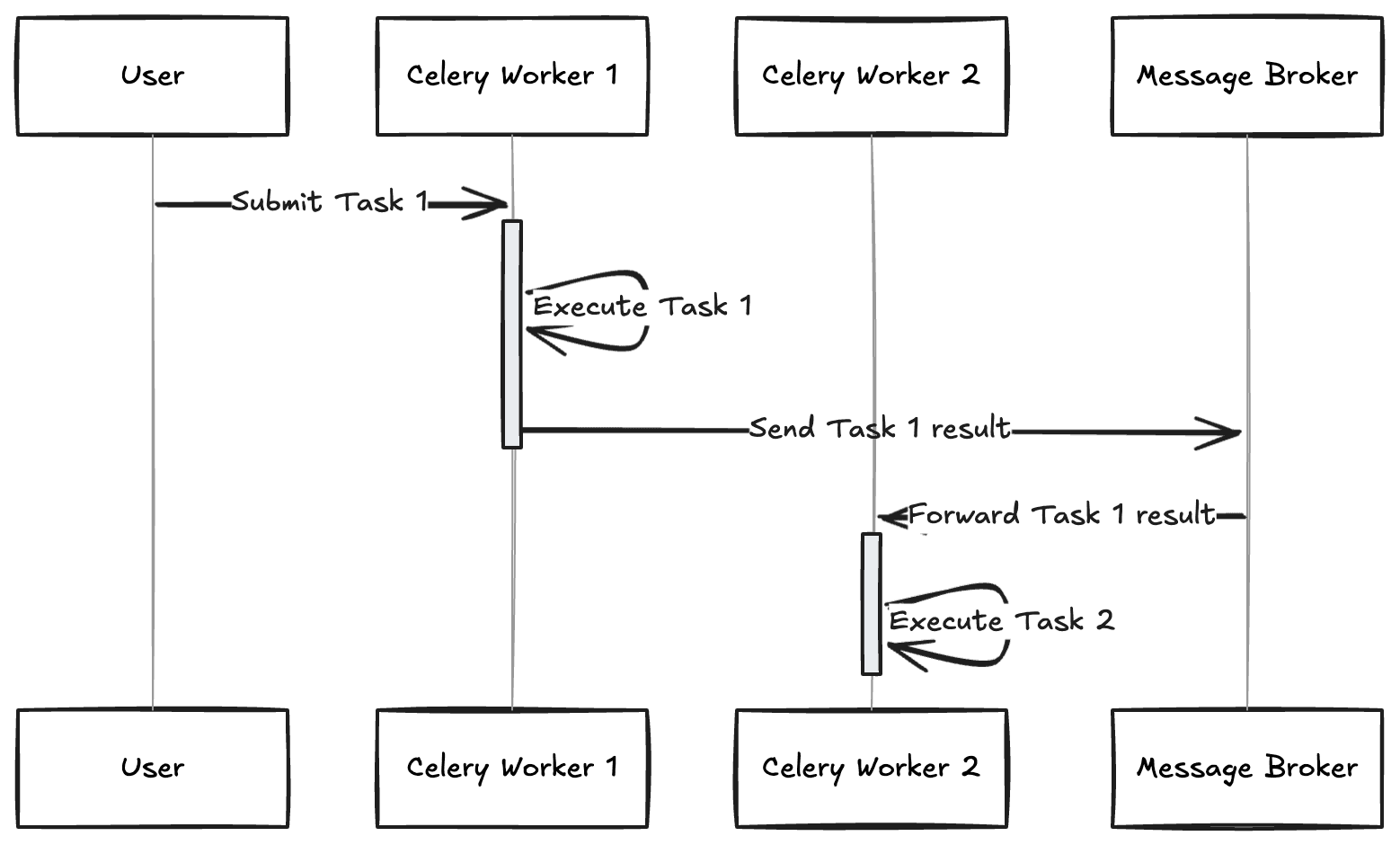
In this code we used Celery's signature to construct our chain, notice that the second task "power" does not take a parameter, this is because Celery will send the result of the first task to the parameters of the second task. And that's why we get args[0] inside the power function. The two tasks will be dispatched to the broker at once, and a task_id will be generated by Celery and returned to the user. The worker will execute the first task and automatically send the result to the next task in the Chain. The schema below explains what happens when we execute this chain.
DAG workflows
In the previous section, we have seen how to run tasks sequentially in a celery chain, in this section we will present some other feature provided by celery, that allow to run tasks in parallel.
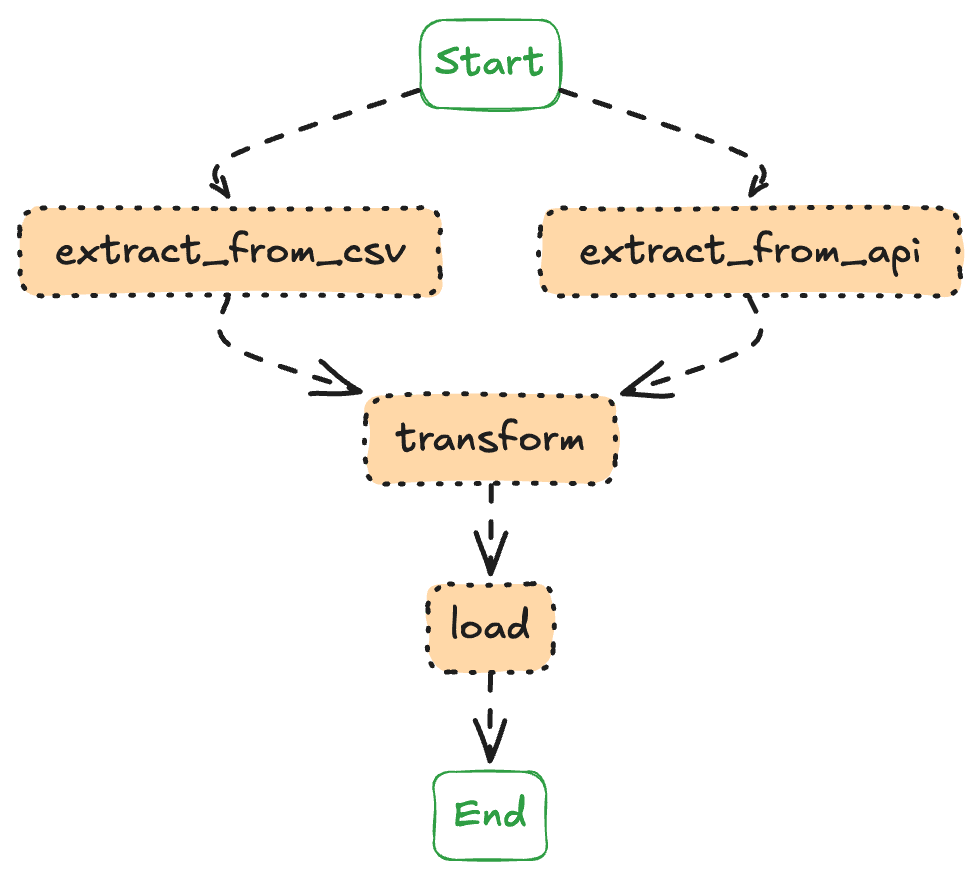
To show how to implement DAG using celery, we will implement an ETL pipeline which contain four tasks: the two first tasks are used to extract data from CSV and from API, these two task must run in parallel, a transform task that takes the extracted data as parameter and a final task to load the data. The diagram below show the four tasks of our workflow:
The following code implement this workflow using celery chain and group
12from celery import task, chain, group34@task5def extract_from_csv():6 """Extract data from a CSV file."""7 print("Extracting data from CSV...")89@task10def extract_from_api():11 """Extract data from an API."""12 print("Extracting data from API...")1314@task15def transform():16 """Transform the data (e.g., normalize, clean, or aggregate)."""17 print("Transforming data...")1819@task20def load():21 """Load the transformed data into a new CSV file."""22 print("Loading data into the target CSV...")232425parallel_tasks = group(extract_from_csv.s(), extract_from_api.s())2627# Construct the workflow28etl_pipeline = chain(29 parallel_tasks,30 transform.s(),31 load.s()32)3334# Execute the workflow35etl_pipeline.apply_async()36
By combining extract_from_csv and extract_from_api into a group, we enabled them to execute in parallel, maximizing efficiency. This group was then added to our chain, ensuring that the subsequent tasks would only begin once both extraction processes were complete.
Wrap Up
Celery is an asynchronous task queue that enable developers to execute tasks in the background using python code. In this course we have seen how to create workflows using celery's canvas.